1. Begin with the communication problem
A disaster does not always look like a nationwide internet outage. A local power cut can disable your Wi-Fi while mobile networks remain available. A storm can damage cellular infrastructure and cables while your house still has power. Floods may force you to leave equipment behind. Your first job is to identify how you will receive official alerts, contact family, and summon emergency help under different conditions. Broadband is one component, not a substitute for evacuation orders, emergency services or a practiced family plan.
Think of communications in layers. The first layer is receiving information: weather alerts, local authorities, broadcast radio and offline information. The second is local coordination: reaching people close to you, even when the internet is down. The third is long-distance communication. The fourth is distress signaling when ordinary networks are unavailable. One device rarely covers every layer well.
| Layer | Useful options | Limitation |
|---|---|---|
| Receive alerts | Weather radio, phone alerts, broadcast receiver | Usually receive-only; power required |
| Local coordination | FRS/GMRS, amateur radio where licensed | Terrain, range and legal restrictions |
| Long-distance everyday | Cellular, satellite broadband, satellite voice | Subscription and power dependencies |
| Short off-grid updates | Satellite messenger or supported phone | Coverage, message limits and supported regions |
| Life-threatening distress | Registered PLB or appropriate maritime beacon | Distress-only; follow device instructions |
2. Make a family communication plan
Select a familiar meeting place near home and an alternate outside your immediate area. Designate an out-of-area contact who can consolidate updates if local calls fail. Record phone numbers on paper, not only in a cloud contact list. Discuss school and workplace reunification procedures, accessibility needs, pets and medication. Agree on short messages containing location, status, intended destination and next check-in time; avoid sending private medical details over public radio.
A plan works only if everyone understands it. Practice sending a text, calling the designated contact and finding the meeting point. Teach family members when to call emergency services rather than trying to troubleshoot a device. Keep the printed plan in a waterproof bag and update it when phone numbers or schools change. The downloadable family plan is a blank local worksheet; no data is collected by this website.
3. Decide whether satellite broadband adds resilience
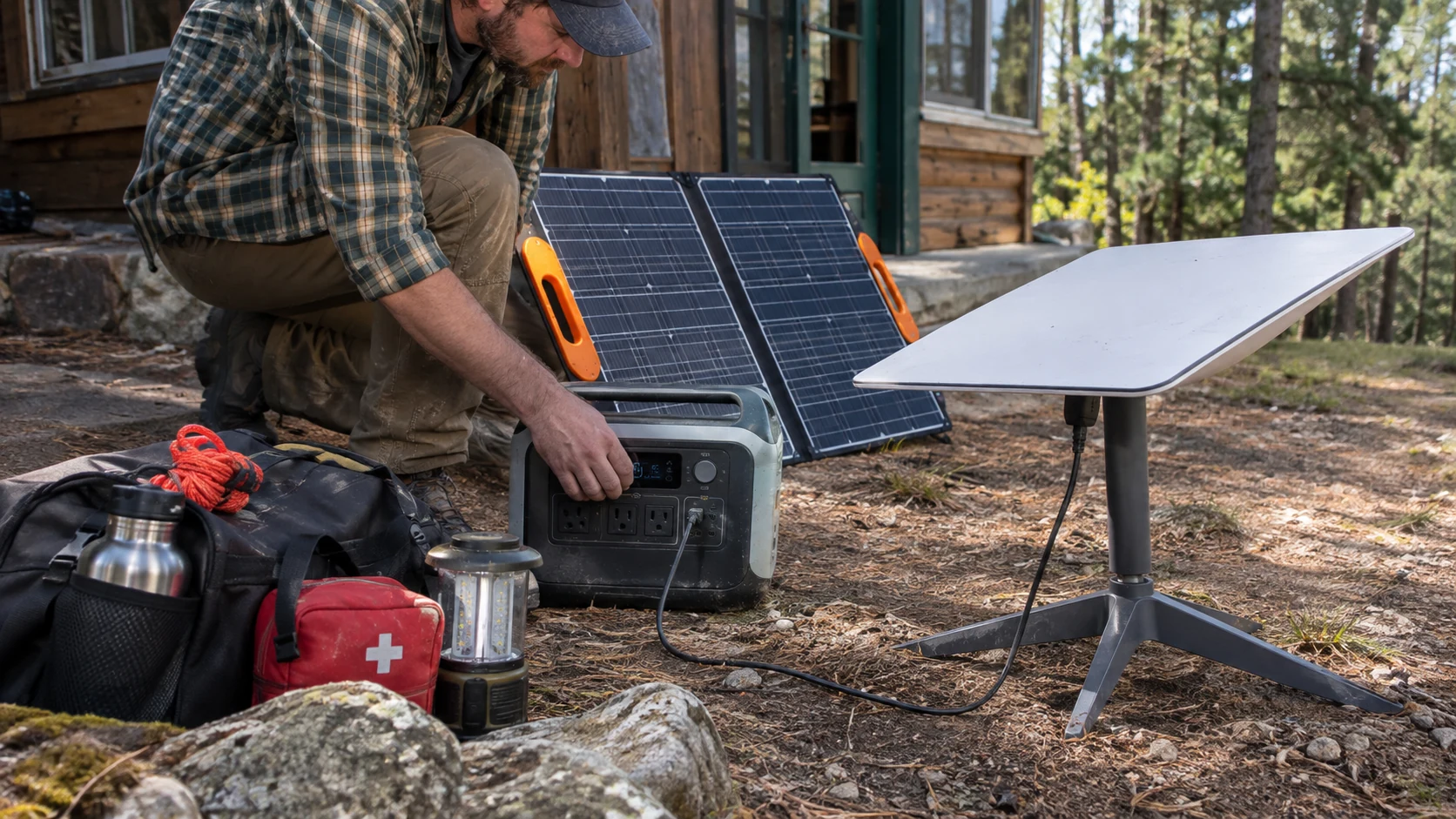
Satellite broadband can bypass damaged local cable or tower connections and support internet messaging, Wi-Fi calling, remote work and access to maps. It cannot function without a powered terminal and adequate sky access, and satellite networks also experience failures. A roof-mounted installation may be unusable after structural damage; a portable kit can be deployed somewhere safe after conditions improve. Do not deploy outdoors during lightning, flooding or high winds.
Standby Mode may suit occasional use where available, but learn what bandwidth and reactivation rules apply. Do not count on activating full-speed service during a disaster without a working account and payment method. Test the process when conditions are normal. If keeping a terminal solely for emergencies, check any reward or service eligibility conditions before pausing.
4. Compare phones, messengers and beacons
Satellite phones are purpose-built for voice or data on a compatible network. A pocket messenger is better for short location and status updates when carrying a full terminal is impractical. Some smartphones provide satellite messaging in certain markets; features, emergency routing and coverage vary. A 406 MHz personal locator beacon is different: it alerts the international search-and-rescue system for genuine distress and is not designed for ordinary family conversation. Register a beacon, keep its battery within service life, and use the manufacturer's self-test procedure; never activate an emergency transmission simply to see if it works.
Satellite broadband offers a much larger set of internet applications but costs more energy and space. A hiker who needs a distress option may prefer a beacon or messenger; a household that needs to run an entire network may prefer a dish. A resilient family can use both. Consult NOAA beacon guidance and the provider guide.
5. Radio: valuable even without the internet
FRS and GMRS are U.S. personal radio services with equipment and operating rules. GMRS generally requires an individual FCC license; eligible immediate family members may operate under it within the applicable rules. Amateur radio requires the appropriate license and examination for ordinary transmitting privileges, offers local and long-distance communication modes, and is not a replacement for a commercial service. Other countries have different licensing rules. Read current regulations before transmitting, and use compliant equipment. Range depends on terrain, antenna placement and repeaters; a repeater can itself lose power.
A receive-only radio can still be useful. Store appropriate batteries, know local alert frequencies through official resources, and learn how to operate the device before a disaster. Do not rely on advertised range claims. For family coordination, plan what to do when the signal fails: return to a meeting location, use a scheduled check-in or try an alternate communications layer.
6. Size a 72-hour kit
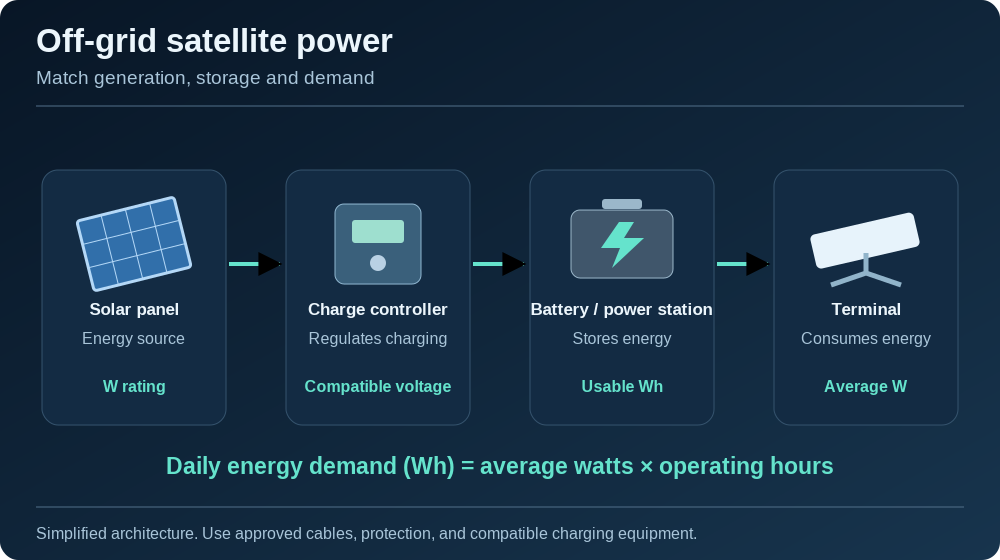
Suppose a terminal averages 30 W and is used for 6 hours per day. It needs 180 Wh per day, or 540 Wh over three days. Add phones, a router if necessary and charging losses. With an illustrative 85% usable battery fraction, the dish alone needs about 635 Wh of rated storage. Adding a 25% planning reserve produces about 794 Wh. A smaller battery may be sufficient with more limited duty cycles or reliable recharging, but never assume a solar panel delivers its label rating continuously.
| Item | Reason |
|---|---|
| Compatible terminal and cables | Establish broadband where usable |
| Charged battery or approved power supply | Independent electricity |
| Paper account recovery instructions | Reduce dependence on cloud access |
| Phones, cables and radio | Local updates and alternate paths |
| Weatherproof storage and safe deployment spot | Protect equipment and reduce setup time |
| Printed contacts and maps | Function without internet |
The off-grid guide explains sizing for longer outages. Only use compatible power equipment and operate generators outdoors far from openings in accordance with safety guidance. Never connect a portable generator to household wiring without appropriate transfer equipment installed by a qualified professional.
7. Practice before you need it
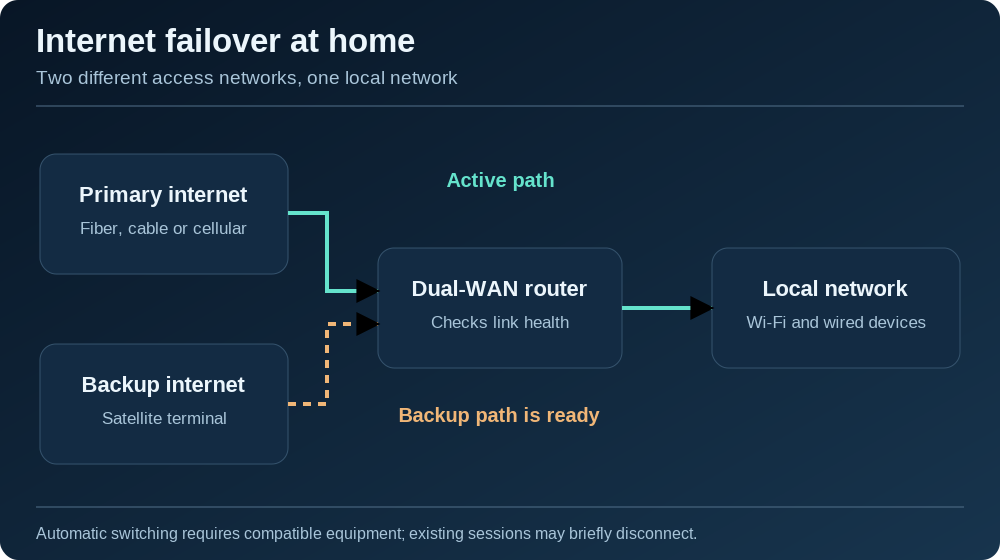
Schedule a simulated internet outage on a safe day. Tell household members, avoid interrupting medical or alarm systems, and disconnect the primary WAN rather than cutting the entire house power. Bring the backup network online. Check that a phone can send an ordinary message, that a laptop can reach required services and that the account can be managed. Record time to restore connectivity, average power and problems. Do not place a test emergency call or activate a distress device.
In a real event, prioritize essential traffic and conserve battery. Disable large cloud backups and optional downloads when bandwidth or power is scarce. Give family members a schedule for connectivity rather than leaving the dish running continuously if stored energy is limited. Use official alerts and emergency procedures first. After the event, recharge and inspect the kit, review what failed, and update the plan.
8. Learn from actual disasters without promising miracles
Satellite deployments can help restore communications when terrestrial infrastructure is damaged. Documented disaster case studies show benefits for responders and communities, but each event differs in power availability, congestion, logistics and authorization. An emergency connectivity product is not a guaranteed rescue system. See the disaster case studies, EMP and solar storm guide, and communications comparison to build a layered plan.
9. Plan for outages with different causes
A brief household outage might leave cellular networks intact; in that case a charged phone and a small power bank may be enough. A damaged local broadband cable may make a mobile hotspot adequate for work. A regional weather disaster may affect both cellular and wired infrastructure, in which case satellite can provide another path once conditions are safe. An evacuation makes weight, portability and local permissions more important than the capacity of a permanently mounted dish. An extended grid failure makes energy conservation and a separate distress option more important than continuous internet access.
Build a written decision tree: first follow local safety guidance; then establish contact with the out-of-area person; then determine which communication methods still work; finally deploy the appropriate backup if safe. This is different from waiting until a disaster to learn an app or search for cables. Place essential supplies in accessible storage, and make sure another household member can operate them if the usual operator is unavailable.
10. A seven-day energy and communication scenario
Suppose a household plans two 90-minute broadband check-in windows per day with an average terminal load of 30 W. That uses 90 Wh per day, or 630 Wh over seven days. Add 30 Wh per day for phones and 10 Wh for another device, for a total of 910 Wh. At an illustrative 85% aggregate usable-energy fraction, about 1,071 Wh rated storage is required before reserve. A 25% reserve increases that to about 1,339 Wh. This is only an energy model; the terminal's source must still meet the required peak rating and weather may change power consumption.
If a solar panel generates 150 Wh on a poor-weather day, the example daily load of 130 Wh is barely covered before other charging constraints. On a day with no practical solar harvest, storage must cover all usage. A plan should specify how to reduce internet time if battery energy falls below a threshold. Maintain an independent radio, messenger or beacon where appropriate rather than using the last battery energy for optional entertainment.
11. A communications exercise worksheet
Write the start time of an exercise, which connection was intentionally disconnected, what the backup setup consisted of, and when the first ordinary test message was delivered. Record whether all users knew the alternate network name, whether credentials were accessible offline and whether a portable battery could handle startup. After restoring normal service, identify three improvements. Do not deliberately disable alarms or medical equipment, call emergency services for practice, or test a beacon by activating its distress transmission. The goal is to identify preparation gaps before a real emergency, not to make an outage more difficult.