
How to build a home backup internet system
Updated November 24, 2026 · 3 min read (approx.)
A useful backup system includes a second internet path, independent power and a tested switching procedure.
In this guide
Manual failover
Keep the backup Wi-Fi name and password available offline. During an outage, power the backup terminal and connect essential devices.
Automatic failover
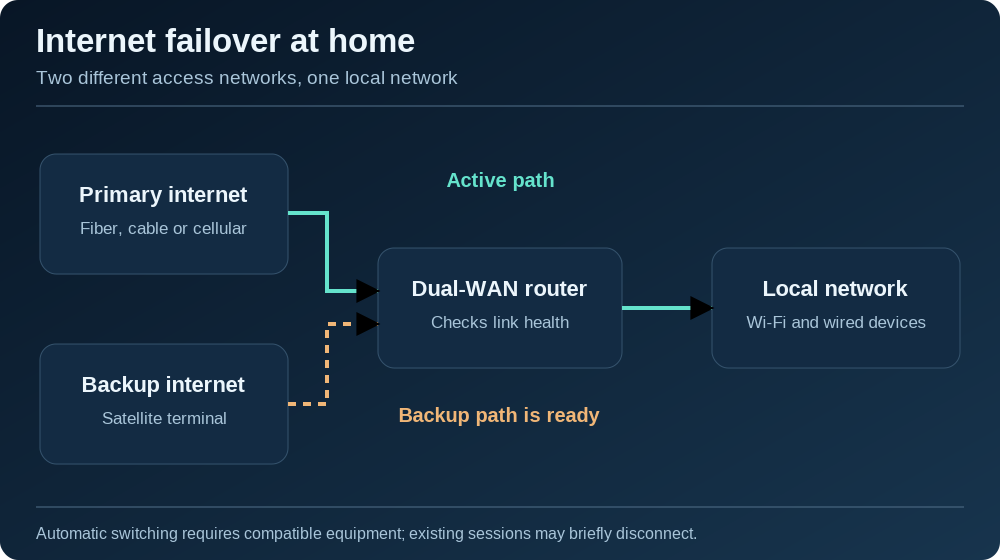
A compatible dual-WAN router can switch between primary and backup connections. Confirm health-check settings and test how existing sessions behave during switching.
Practice
Run a simulated outage periodically. Verify battery runtime, service status and the ability to contact family. Keep non-internet emergency options available.
Reference guide · Updated November 24, 2026
Design for different failure modes
A second subscription is only useful if it is available when the primary one fails. Cable and fibre may share poles or local power; two cellular providers may use the same tower or backhaul. Satellite provides a physically different last-mile option but still needs power and wider internet infrastructure.
Manual vs automatic failover
| Method | How it works | Tradeoff |
|---|---|---|
| Separate Wi-Fi networks | Manually join backup Wi-Fi | Simple, but devices must be switched |
| Dual-WAN router | Router selects a healthy internet path | Requires compatible equipment and health checks |
| Managed resilient networking | Professional connectivity monitoring and redundancy | Higher cost; useful for business-critical applications |
Changing paths can change public IP addresses and interrupt VPNs, video sessions or downloads. Automatic failover is not necessarily seamless bonding. Test the work applications you actually need.
Example household test
- Keep the primary router connected as normal and charge the independent backup battery.
- During a planned low-impact test, disconnect the primary internet link without cutting unsafe wiring.
- Time how long it takes to reconnect to the backup and open essential services.
- Check laptop, phone and router power runtime. Restore normal service and document the steps.
For emergency communication, add a separate messaging or alert method and an offline contact plan.
Evidence and further reading
- Starlink: How much power does my Starlink need? Manufacturer specification
AC input averages by terminal model; actual draw varies.
- Ready.gov: Make a plan Government preparedness
Family contacts, meeting places and emergency planning.
- Starlink app alerts Manufacturer guidance
Distinguishes Wi-Fi, obstruction, overheating and service outages.
Sources are linked to original publishers or identified public records. Plan documents and specifications may change. See the research library for evidence types and limitations.
Official resources
Starlink support and equipment guidance · Availability map · Equipment specifications
Related guides
- How to power Starlink with a battery or solar panel
- Does Starlink work in rain, snow and storms?
- Cost calculator
- Referral eligibility
Planning tools · Dated pricing snapshot · Testing methods
Independent guide. I may receive a reward if you use my referral link and qualify. Not affiliated with Starlink or SpaceX.
Get Starlink $100 Offer ↗Eligible new US customers; two full qualifying billing cycles. Terms apply. Not a checkout discount. We may also receive a reward if you qualify. Offer details.