
1. What Starlink is — and what it is not
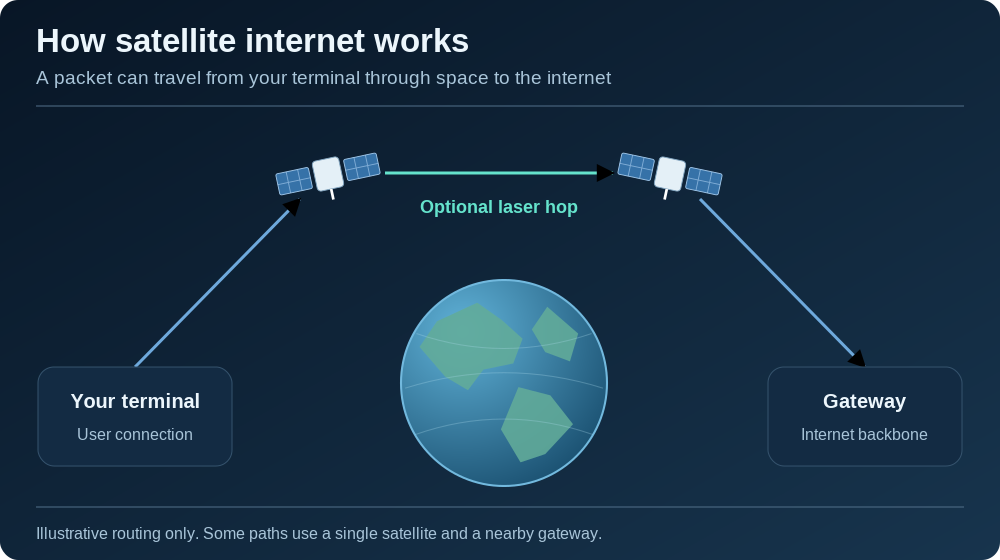
Starlink is an internet access service operated by SpaceX. Your terminal is a specialized radio, not a conventional television dish or a mobile phone hotspot. It exchanges data with spacecraft in low Earth orbit (LEO), while a router distributes that connection over Wi-Fi or Ethernet. The spacecraft connect traffic to terrestrial internet infrastructure, sometimes via other satellites. You still need electricity, an authorized service plan and a usable view of the sky.
This distinction matters for a household with weak broadband. Buying a dish does not by itself create unlimited connectivity everywhere. The useful question is whether the combination of hardware, local network capacity, sky view, plan and power can meet your particular needs. A home with excellent inexpensive fiber will often be better served by keeping it; the same family may find satellite attractive as a separately powered backup.
| Need | Start by considering | Verify before buying |
|---|---|---|
| Primary rural internet | Standard equipment and a residential plan | Address availability, peak-hour uploads, mounting |
| Portable emergency kit | Mini and an eligible occasional-use plan | Power budget, reactivation, reward conditions |
| RV or seasonal cabin | Mini or Standard with suitable mobility plan | Data allowance, camping sky view, travel rules |
| Business continuity | Managed router and appropriate business service | SLA, security, failover and recovery objectives |
| Wilderness distress calls | Satellite messenger or registered PLB | Device coverage, rescue service, local rules |
2. How to choose hardware
There is no single best dish for every customer. The Mini integrates Wi-Fi into a small terminal, reducing the number of devices to carry. Larger Standard equipment is intended for more demanding fixed use and may provide a better starting point for a busy household. High-performance equipment belongs in a separate category: compare the actual mobility, environmental and networking requirements rather than assuming a higher price automatically improves service at a blocked location.
Identify the precise model number before ordering cables or mounts. Product generations can look similar but have different connectors, power supplies and mounting systems. A second-hand kit may also require a successful account transfer and can be subject to restrictions. Never assume an advertised used kit includes a service subscription or is eligible for referral incentives. The equipment database compares model families and links to official specifications.
3. Coverage, capacity and the sky
Availability has three layers. First, the operator must have permission to sell or deliver service at the location. Second, the local satellite network must have enough capacity to support the product. Third, your installation needs workable signal paths. A map can help with the first two but not guarantee the third. Scan the proposed position using the official app, not just an open spot twenty feet away.
A larger constellation can create more possible paths around some obstacles. Nevertheless, radio signals do not magically bend around a dense roof or canopy. A dish with frequent short interruptions may seem fine for buffered video but perform poorly during live meetings. Inspect the obstruction map and interruption history after the terminal has operated long enough to build useful statistics. Consider leaf growth, a neighbor's future trees and snow accumulation, not only today's weather.
4. Installation: work from the ground up
Start with a temporary, safe ground-level installation in a clear area. Follow the model-specific setup guide, use approved cabling, and let the app guide orientation. Connect a single device close to the router, establish that the internet works, then expand your network. A bad Wi-Fi signal inside a house is not proof of a bad satellite signal. Move the test device near the router or use a supported wired connection to isolate the problem.
For permanent mounting, think about wind loads, cable protection, water entry and safe access for maintenance. A roof, chimney, pole or wall installation can require different hardware and professional assistance. Do not climb a roof to chase an app alignment warning. Check that the chosen position leaves the antenna's required sky sector open and that the mounting structure can support it safely. Avoid power lines, exhaust vents and improvised brackets.
5. Understand what you are paying for
Build the quote in layers: hardware, shipping, taxes, installation, monthly service, optional data, equipment accessories and backup electricity. A promotional hardware price is not necessarily the regular price. A referral reward is conditional and is not necessarily an instant cash reduction; confirm eligibility and the qualifying service period before relying on it. Do not subtract the benefit twice, or assume pausing service immediately qualifies.
Consider a deliberately illustrative scenario: equipment $249, mount $75, active service $80 for four months, standby $10 for eight months. Total before taxes or rewards is $724. Twelve active months at the same price would total $1,284 including equipment and mount. Neither example is a live plan quote. If your backup use is intermittent, check the current terms for standby and reactivation and model the actual number of billing months. The cost calculator makes these assumptions editable.
6. Performance: measure what affects your life
Download speed tells you how quickly data arrives; upload matters for sending files and video. Latency measures response delay, jitter its variation, and packet loss the share of packets that fail to arrive. A brief interruption may cause a VPN session or video call to fail even when an isolated speed test looks excellent. Measure during busy evening hours and during the times you actually work. Keep a wired or near-router baseline so that household Wi-Fi is not confounded with satellite performance.
Test three real workloads: a video call, a representative file upload and a streaming session. Record whether either direction is slow, whether interruptions occur, and whether the same problem appears on a second device. A speed test is a snapshot, not a promise of future performance. Read performance and research before interpreting results.
7. Traveling, pausing and sharing
A residential subscription is not automatically a travel subscription. Roam plans can offer portability, but plan limits, international registration, ocean usage and in-motion permissions differ. The provider's current international policy includes a 30-day outside-home-region allowance for Roam Unlimited, with separate regional grouping rules and exceptions. Other Roam plans generally operate within the home country or grouped region. Always check the actual destination, service type and hardware permissions before a trip. Use the country directory.
Standby is a low-bandwidth service option where offered, not a guarantee of full broadband or free service. Before emergency use, learn how to resume an eligible plan without relying on a dead cellular connection. Test your equipment on a normal day, check account access, and store the official instructions offline. If you intend to share service outside your household, check the plan's restrictions and do not assume resale is permitted.
8. Build a resilient setup, not a single point of failure
If your primary internet goes down, ask what else may have failed: utility power, router, cable, tower or regional backhaul. A satellite connection bypasses some of those dependencies but still needs power and working operator infrastructure. Keep a compatible charged power supply, a safe place to deploy the dish, and an alternate way to send urgent messages. An automatic failover router can simplify switching but requires periodic practice. See the emergency guide and networking guide.
9. Troubleshooting decision path
Start with power and the app status. If the terminal is offline, inspect the correct connectors and power source without opening equipment. If it is online but the connection is slow on one device, isolate Wi-Fi before blaming the network. If all devices lose connectivity, inspect obstruction and outage statistics, test at another time of day, and check the provider's support channel. If repeated resets are required, document the dates, environment and error messages rather than guessing. Change only one variable per test.
10. Frequently asked questions
Can Starlink work in the rain? Often yes, but precipitation can attenuate high-frequency links and severe conditions can interrupt service. Do not go outside to adjust equipment during dangerous weather.
Do I need to replace fiber? No. If fiber is reliable and affordable, consider satellite only if portability or backup diversity justifies another bill.
Can I use the Mini with a battery? Yes, with compatible equipment that can supply the required voltage and power. Read the Mini guide before selecting a source.
Is the reward guaranteed? No. Check the official referral terms and current checkout; our disclosure explains our relationship. We may earn a qualifying reward.
11. Your purchase checklist
Record your actual price quote, preferred installation location, measured or modeled power requirements, expected monthly usage, policy constraints, mounting costs, and return-window conditions. Decide what successful performance looks like before purchase: for example, a stable video call during your work hours and enough battery energy to send messages during a power failure. Test against that standard rather than relying on advertising alone.
12. Worked buying scenarios
Rural household with two adults working remotely. Suppose the only wired option is slow DSL and the cellular hotspot becomes congested in the evening. Satellite may offer an improvement, but the family should define success as reliable meetings and uploads, not just an impressive download test. Identify two mounting positions, scan both, obtain a local quote and investigate installation costs. During any applicable return window, test multiple meetings and file uploads at the same hours the family normally works. If fiber is expected to arrive soon, compare the short-term benefit with hardware and switching costs. Keep the DSL connection until the replacement has been demonstrated.
Urban household with reliable fiber. An additional satellite subscription may seem expensive compared with the primary connection. Its value is not necessarily the daily speed but the ability to bypass a local access failure. Estimate the frequency and cost of downtime, then compare a second cellular network against a satellite setup. If most outages are brief and a phone hotspot already works, satellite may be unnecessary. If the household faces long power outages or frequent tower problems, a battery-powered Mini can diversify the access path. The backup is useful only if it is charged, activated under the correct terms and deployable when needed.
Seasonal traveler. A family visiting campsites for six months per year may prefer a plan that supports travel. The important variables are data use, regional limits, stationary versus moving deployment, and energy. They should verify whether their destination is authorized before booking a site around connectivity. If the family uses a 100GB plan, large operating-system updates and multiple streaming devices can quickly consume the high-speed allowance. Set data-use controls before traveling and use downloaded entertainment where practical. The data guide provides further examples.
13. Diagnose a weak installation without throwing money at it
Record a baseline near the router while the app reports a clear satellite link. If wired or near-router throughput is healthy but a distant room is slow, improving Wi-Fi placement may help more than buying a different dish. If the app reports repeated obstructions while all devices experience brief drops, compare a safe alternate location. If speeds fall only during peak demand with no obstruction events, congestion or plan priority may be relevant. If the connection fails when a battery runs low, solve the power issue first. These are diagnostic hypotheses, not certainty; change one factor at a time and record the results.
14. Understand the customer lifecycle
Keep a record of the initial quote and purchase terms, then save the installation date and baseline measurements. Review your plan when your usage changes; a seasonal traveler may not need the same service in winter. When transferring or reselling hardware, follow official account-transfer instructions and remove stored network credentials. If the service no longer meets your needs, investigate cancellation, return, reactivation or transfer rules before changing account status. A reward, warranty or introductory price may have conditions that are separate from the basic monthly billing cycle. Our historical archive preserves past quotes without presenting them as current promises.