Separate your WAN from your LAN
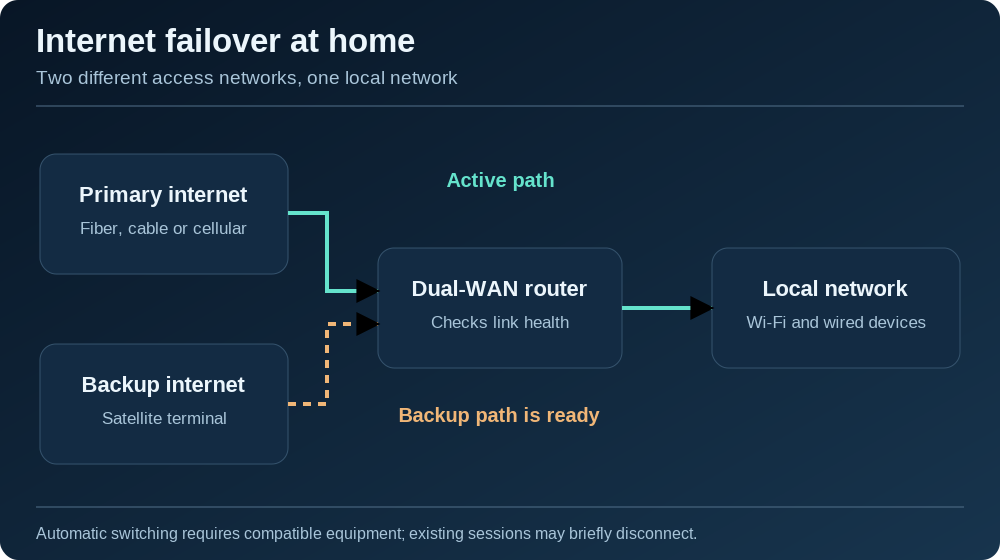
WAN is the connection from the router to the wider internet; LAN is the local network connecting devices. A Starlink terminal and a fiber service can be independent WANs while sharing one LAN. Mesh Wi-Fi extends local coverage, not satellite coverage. It cannot fix loss of the external link. Diagnose local signal strength and wired performance separately from the service connection.
Failover versus load balancing
A dual-WAN router can monitor a primary link and switch to a backup when a health check fails. A useful health check probes reachability beyond the immediate modem, and uses multiple destinations where supported. Use a failure threshold and recovery delay so transient latency does not cause constant switching. Load balancing sends different flows over different connections; bonding across multiple links generally requires an additional cooperating endpoint or service. Neither ordinary failover nor load balancing guarantees preservation of existing TCP sessions when the public IP changes.
| Feature | What it does | What it cannot guarantee |
|---|---|---|
| Dual WAN failover | Switches when the primary fails | No dropped sessions |
| Load balancing | Distributes flows | One flow at combined speed |
| Mesh Wi-Fi | Extends local wireless access | Fix satellite outage |
| VPN | Encrypts traffic to a chosen endpoint | Fix congestion or guarantee anonymity |
| UPS | Provides short-term energy | Infinite uptime |
Example architecture
Keep fiber as WAN 1, a compatible satellite connection as WAN 2, and a dual-WAN router feeding the home switch and access points. Power the router, needed switch, primary optical network terminal and satellite kit from appropriate backup equipment if required. Avoid overlapping IP subnets on both upstream routers. If the satellite router supports a manufacturer-approved bypass mode or appropriate Ethernet connectivity, use the supported method; do not assume every generation exposes the same ports. Document credentials and how to undo changes.
CGNAT, VPNs and inbound access
A service using carrier-grade NAT may share public IPv4 addresses among customers, complicating unsolicited inbound connections or port forwarding. Availability of public addressing, IPv6 and other features depends on the product and provider. An outbound VPN can be useful for corporate access, but latency and packet loss can affect it. Use approved work VPN policies; do not open unnecessary inbound ports to make a camera accessible. Prefer authenticated supported remote access mechanisms.
Home security checklist
Use a unique admin password, current firmware and supported encryption. Separate guest and untrusted IoT devices where your equipment permits. Disable remote administration from the internet unless necessary and securely configured. Use multi-factor authentication on service accounts, update client devices and keep encrypted backups. A VPN does not make insecure devices safe. NSA's published home networking guidance is a useful foundation.
Test failover in normal conditions
Choose a safe test window. Record normal latency and upload, disconnect only the primary WAN, and time how long a new connection takes to work. Note whether calls and VPN sessions reconnect automatically. Restore the main connection, observe failback and repeat on another day. Do not disrupt critical medical or alarm services. A successful demonstration is evidence for that configuration, not a guarantee during a disaster. Use the measurement database to record results.